Token Persistence
In WSO2 Identity Server, OAuth2 token persistence is integral to authentication, authorization and token validation. This guide describes OAuth2 token persistence and the possible approaches you can follow for token persistence in a production environment.
For opaque tokens, by default, Identity Server stores opaque tokens directly in the database, preserving their original form. For JSON Web Tokens (JWTs), by default Identity Server stores references instead of the complete tokens, optimizing storage. The OAuth2 component in WSO2 Identity Server (WSO2 IS) has two implementations that can be used to handle token persistence in the database (synchronous and asynchronous token persistence).
The following sections guide you through the difference between these two approaches and how to configure them.
Synchronous token persistence
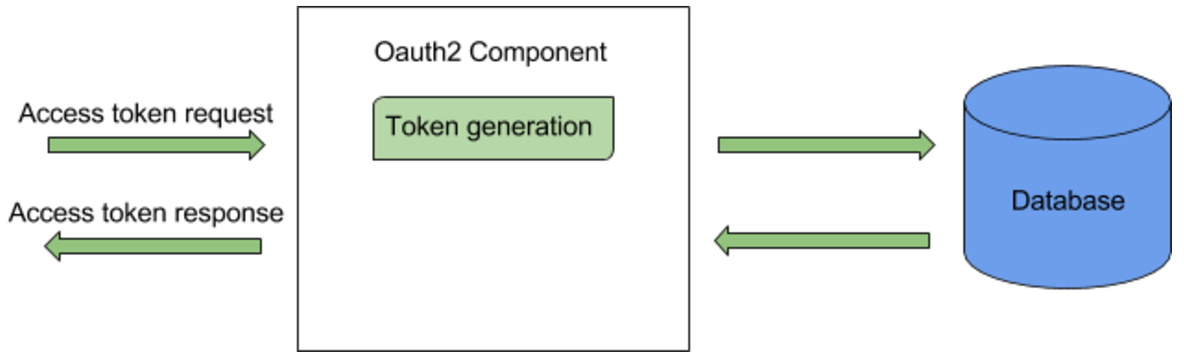
The flow of synchronous token persistence is as follows:
- The client sends an access token request.
- The OAuth2 component in WSO2 IS checks for an existing active access token for the given client/user/scope. First it checks the cache and if an active token is not found, then checks the database.
- If an active access token is found, the token is returned to the client.
- Alternatively, if an existing access token is not found, the OAuth2 component creates a new access token and persists it in the database using the same thread. Once it is persisted, the new token is returned to the client.
Synchronous token persistence configurations
By default synchronous token persistence is enabled in WSO2 Identity Server 5.9.0
onwards. To indicate the number of times to retry in the event of a
CONN_APP_KEY violation when storing the access token, navigate to file
<IS_HOME>/repository/conf/deployment.toml and add the following
configuration.
[oauth.token_generation]
"retry_count_on_persistence_failures"=5
Tip
To know more about new configurations, see New Configuration Model.
Asynchronous token persistence
If an existing access token is not found, the OAuth2 component creates a new access token and adds it to a persisting queue. Once the token is added to the queue, the token is returned to the client.There are background threads that consume the queue, and persist the tokens in the queue to the database.
Going Forward
Previously, WSO2 recommended asynchronous token persistence for certain scenarios. However, we have empirically found out that synchronous token persistence has a better overall performance in general. Hence, asynchronous token persistence is not supported from WSO2 Identity Server 5.9.0 onwards.
Recovery flow for token persistence
This section explains the recovery flow triggered in WSO2 Identity
Server for exceptional cases that may occur in a production environment
caused by the client application mishandling the
CON_APP_KEY constraint that is explained below.
CONN_APP_KEY constraint
For a given set of consumer key, user, and scope values, there can be
only one ACTIVE access token. The CON_APP_KEY
constraint in the IDN_OAUTH2_ACCESS_TOKEN table
enforces this by allowing only one active access token for a given set
of consumer key, user, and scope values. This constraint may be violated
in a scenario where two or more identical token requests come from the
same application.
The above scenario is unlikely because in practice, an application is usually designed to handle this situation using scopes, or in the case of a multithreaded client, there is usually a separate thread to acquire access tokens so that other threads can retrieve from it.
Synchronous token persistence
The flow
The flow of the synchronous token persistence when receiving two identical access token requests is as follows:
- The client sends an access token request.
- The OAuth2 component in both nodes of WSO2 IS checks for an existing active access token for the given client/user/scope. Both nodes first check the cache and if an active token is not found, the database is checked.
- Alternatively, if an existing access token is not found, the OAuth2 component in both nodes creates a new access token and persists the access token to the database using the same thread.
- One of the nodes will persist the token successfully and return it
to the client but the other node will receive an error due to the
violation of the
CON_APP_KEYconstraint.
The recovery flow
The process flow now moves on to the recovery flow described above in
order to handle the CON_APP_KEY constraint violation
and is executed as follows:
- Since the same thread is being used, the OAuth2 component in the second node checks the database again for an ACTIVE access token.
- Since there is now an ACTIVE token which was persisted by the first node, the second node now returns the access token persisted by the first node to the client.
- Both access token requests receive the same access token.
Optimizing JWT Access token persistence
By default, JWT access-token generation or validation triggers interactions with the database. JWT access-token persistence differs from opaque-token persistence, where an existing active token is retrieved during a token request. The issuer always issues a new JWT access token. The following sections explain how to optimize the default JWT persistence in Identity Server using non-persistent access token.
Note
This feature is available for WSO2 Identity Server 6.1.0 as of update level 264 and currently supports H2 , MySQL and Oracle databases.
Why optimize JWT Acces token persistence?
In large-scale WSO2 Identity Server deployments, especially with millions of users and high concurrency, the number of tokens stored in the database can grow quickly, making it harder to scale. This can lead to reduced performance and lower Transactions Per Second (TPS) for token generation. To address this, token persistence optimization helps by not storing access tokens. This approach avoids storing access tokens during generation while still supporting essential features like token revocation and refresh grants, improving scalability and performance.
- Reduce database queries during token request: When a token is issued, both access token and refresh token will no longer be stored in the
IDN_ACCESS_TOKENtable. As a result, authorization grants like Client Credentials, which do not issue a refresh token, will experience improved throughput due to the reduction in database query overhead. - Efficient database storage: When tokens are stored in the persistent access_token mode, new entries are added to the database with each token request, even if the same refresh token is used. However, with the non-persistent access token feature enabled, only the refresh token is stored. If the current refresh token is still valid for the grant, no additional database rows will be added during token requests, leading to more efficient database storage.
- Improved token validation: With the non-persistent access token feature enabled, revoked tokens can be stored in the database. However, deployments have the option to opt out of storing revoked tokens and can instead listen for revoked token events, providing greater flexibility in token management. This approach is particularly beneficial when the Identity Server acts as a Key Manager for WSO2 API Manager, as the Gateway can self-validate JWTs without additional hops to the Key Manager, improving performance and reducing latency.
Things to consider when using JWT access token persistence optimization
- This mode is particularly suitable for the following scenarios:
- When most token requests are based on authorization grants such as Client Credentials, which do not issue a refresh token.
- When Refresh Token Grants are configured without refresh token rotation, reducing the need for persistent token tracking.
- The token persistence optimization feature works only with JWT access tokens, as they can be self-validated.
- When enabling this feature in an existing setup:
- Opaque token generation will continue to work as expected for applications configured to use opaque tokens.
- Applications configured for JWT access token type will be switched to non-persistent access token mode, meaning all jwt access tokens will not be stored in the database.
- In the case of persistent token storage, if an active access token already exists during the token generation flow, the existing token will be marked as inactive. However, in the non-persistent mode, multiple active tokens can exist, as the authorization server does not store the access tokens.
- Token binding, Retrieving authorized apps for user and OIDC Request Object features are currently not supported for non-persistent access token mode.
- Actions like Revoking issued access token when re-submitting authorization code and Revoking all issued access token when revoking refresh tokens also not supported cause Identity server won't store any access token.
- In non-persistent mode, the cleanup deletes the selected entries; they are not moved to an audit table as in the persistent case.
- Following are the additional claims that will be added to the JWT access token for the internal references.
Claims Description entity_idUnique Identifier to identify the subject within the system.
- For application: Client Id.
- For Users from unique Id user store: User Unique Id.
- For Users from non-unique Id user store: Username with userstore domain and tenant domain.
- For non-JIT provisioned federated Users: Session Id.
entityTypeType of entity id.
- For application: CLIENT_ID.
- For Users from unique Id user store: USER_ID.
- For Users from non-unique Id user store: USER_NAME.
is_federatedFlag to show whether the user is federated or not.
token_idToken id for internal reference.
is_consentedFlag to show whether the user is consented for claims.
grantTypeGrant type
Enable JWT access token persistence optimization
Tables required for this feature
-
If you want both non-persistent access tokens and non-persistent refresh tokens, the following tables are sufficient:
-
IDN_OAUTH2_REVOKED_TOKENS -
IDN_SUBJECT_ENTITY_REVOKED_EVENT -
However, if you are using long-lived JWT refresh tokens with token rotation upon refresh token grant, persisting the refresh token is recommended. In that case, you will need the following tables in addition to the above:
-
IDN_OAUTH2_REFRESH_TOKEN IDN_OAUTH2_REFRESH_TOKEN_SCOPEIDN_OAUTH2_REVOKED_TOKENSIDN_SUBJECT_ENTITY_REVOKED_EVENT
-
Add following tables to the
IDENTITY_DB.H2
CREATE TABLE IF NOT EXISTS IDN_OAUTH2_REFRESH_TOKEN (
    REFRESH_TOKEN_ID VARCHAR (255),
    REFRESH_TOKEN VARCHAR(2048),
    CONSUMER_KEY_ID INTEGER,
    AUTHZ_USER VARCHAR (100),
    TENANT_ID INTEGER,
    USER_DOMAIN VARCHAR(50),
    GRANT_TYPE VARCHAR (50),
    REFRESH_TOKEN_TIME_CREATED TIMESTAMP NOT NULL DEFAULT CURRENT_TIMESTAMP,
    REFRESH_TOKEN_VALIDITY_PERIOD BIGINT,
    TOKEN_SCOPE_HASH VARCHAR(32),
    TOKEN_STATE VARCHAR(25) DEFAULT 'ACTIVE',
    SUBJECT_IDENTIFIER VARCHAR(255),
    REFRESH_TOKEN_HASH VARCHAR(512),
    IDP_ID INTEGER DEFAULT -1 NOT NULL,
    CONSENTED_TOKEN VARCHAR(6),
    PRIMARY KEY (REFRESH_TOKEN_ID),
    FOREIGN KEY (CONSUMER_KEY_ID) REFERENCES IDN_OAUTH_CONSUMER_APPS(ID) ON DELETE CASCADE
);

CREATE TABLE IF NOT EXISTS IDN_OAUTH2_REFRESH_TOKEN_SCOPE (
    REFRESH_TOKEN_ID VARCHAR (255),
    TOKEN_SCOPE VARCHAR (255),
    TENANT_ID INTEGER DEFAULT -1,
    PRIMARY KEY (REFRESH_TOKEN_ID, TOKEN_SCOPE),
    FOREIGN KEY (REFRESH_TOKEN_ID) REFERENCES IDN_OAUTH2_REFRESH_TOKEN(REFRESH_TOKEN_ID) ON DELETE CASCADE
);

CREATE TABLE IF NOT EXISTS IDN_OAUTH2_REVOKED_TOKENS (
    UUID VARCHAR(255) NOT NULL,
    TOKEN_IDENTIFIER VARCHAR(2048) NOT NULL,
    CONSUMER_KEY VARCHAR(255) NOT NULL,
    TIME_CREATED TIMESTAMP DEFAULT CURRENT_TIMESTAMP,
    EXPIRY_TIMESTAMP TIMESTAMP NOT NULL,
    PRIMARY KEY (UUID)
);

CREATE TABLE IF NOT EXISTS IDN_SUBJECT_ENTITY_REVOKED_EVENT (
    EVENT_ID VARCHAR(255) NOT NULL,
    ENTITY_ID VARCHAR(255) NOT NULL,
    ENTITY_TYPE VARCHAR(255) NOT NULL,
    TIME_REVOKED TIMESTAMP NOT NULL,
    TENANT_ID INTEGER DEFAULT -1,
    PRIMARY KEY (EVENT_ID),
    CONSTRAINT CON_SUB_EVT_KEY UNIQUE (ENTITY_ID, ENTITY_TYPE, TENANT_ID)
);
MYSQL
DROP TABLE IF EXISTS IDN_OAUTH2_REFRESH_TOKEN_SCOPE;
DROP TABLE IF EXISTS IDN_OAUTH2_REFRESH_TOKEN;
DROP TABLE IF EXISTS IDN_OAUTH2_REVOKED_TOKENS;
DROP TABLE IF EXISTS IDN_SUBJECT_ENTITY_REVOKED_EVENT;


CREATE TABLE IF NOT EXISTS IDN_OAUTH2_REFRESH_TOKEN (
    REFRESH_TOKEN_ID VARCHAR (255),
    REFRESH_TOKEN VARCHAR(2048),
    CONSUMER_KEY_ID INTEGER,
    AUTHZ_USER VARCHAR (100),
    TENANT_ID INTEGER,
    USER_DOMAIN VARCHAR(50),
    GRANT_TYPE VARCHAR (50),
    REFRESH_TOKEN_TIME_CREATED TIMESTAMP NOT NULL DEFAULT CURRENT_TIMESTAMP,
    REFRESH_TOKEN_VALIDITY_PERIOD BIGINT,
    TOKEN_SCOPE_HASH VARCHAR(32),
    TOKEN_STATE VARCHAR(25) DEFAULT 'ACTIVE',
    SUBJECT_IDENTIFIER VARCHAR(255),
    REFRESH_TOKEN_HASH VARCHAR(512),
    IDP_ID INTEGER DEFAULT -1 NOT NULL,
    CONSENTED_TOKEN VARCHAR(6),
    PRIMARY KEY (REFRESH_TOKEN_ID),
    FOREIGN KEY (CONSUMER_KEY_ID) REFERENCES IDN_OAUTH_CONSUMER_APPS(ID) ON DELETE CASCADE
)ENGINE INNODB;

CREATE TABLE IF NOT EXISTS IDN_OAUTH2_REFRESH_TOKEN_SCOPE (
    REFRESH_TOKEN_ID VARCHAR (255),
    TOKEN_SCOPE VARCHAR (255),
    TENANT_ID INTEGER DEFAULT -1,
    PRIMARY KEY (REFRESH_TOKEN_ID, TOKEN_SCOPE),
    FOREIGN KEY (REFRESH_TOKEN_ID) REFERENCES IDN_OAUTH2_REFRESH_TOKEN(REFRESH_TOKEN_ID) ON DELETE CASCADE
)ENGINE INNODB;

CREATE TABLE IF NOT EXISTS IDN_OAUTH2_REVOKED_TOKENS (
    UUID VARCHAR(255) NOT NULL,
    TOKEN_IDENTIFIER VARCHAR(2048) NOT NULL,
    CONSUMER_KEY VARCHAR(255) NOT NULL,
    TIME_CREATED TIMESTAMP NOT NULL DEFAULT CURRENT_TIMESTAMP,
    EXPIRY_TIMESTAMP TIMESTAMP NOT NULL,
    PRIMARY KEY (UUID)
)ENGINE=InnoDB;

CREATE TABLE IF NOT EXISTS IDN_SUBJECT_ENTITY_REVOKED_EVENT (
    EVENT_ID VARCHAR(255) NOT NULL,
    ENTITY_ID VARCHAR(255) NOT NULL,
    ENTITY_TYPE VARCHAR(100) NOT NULL,
    TIME_REVOKED TIMESTAMP NOT NULL,
    TENANT_ID INTEGER DEFAULT -1,
    PRIMARY KEY (EVENT_ID),
    CONSTRAINT IDN_SUBJECT_ENTITY_REVOKED_EVENT_CONSTRAINT UNIQUE (ENTITY_ID, ENTITY_TYPE, TENANT_ID)
)ENGINE=InnoDB;

CREATE INDEX IDX_TOKEN_CONSUMER ON IDN_OAUTH2_REVOKED_TOKENS (TOKEN_IDENTIFIER, CONSUMER_KEY);

CREATE INDEX IDX_ENTITY_TIME_REVOKED ON IDN_SUBJECT_ENTITY_REVOKED_EVENT (ENTITY_ID, TIME_REVOKED);

CREATE INDEX IDX_REFRESH_TOKEN_HASH ON IDN_OAUTH2_REFRESH_TOKEN (REFRESH_TOKEN_HASH);

CREATE INDEX IDX_AUTHZ_USER_TENANT_DOMAIN_STATE ON IDN_OAUTH2_REFRESH_TOKEN (AUTHZ_USER, TENANT_ID, USER_DOMAIN, TOKEN_STATE);

CREATE INDEX IDX_CONSUMER_KEY_STATE ON IDN_OAUTH2_REFRESH_TOKEN (CONSUMER_KEY_ID, TOKEN_STATE);

CREATE INDEX IDX_CONSUMER_USER_SCOPE_IDP ON IDN_OAUTH2_REFRESH_TOKEN (CONSUMER_KEY_ID, AUTHZ_USER, TENANT_ID, USER_DOMAIN, TOKEN_SCOPE_HASH, TOKEN_STATE, IDP_ID);
MYSQL-Cluster
DROP TABLE IF EXISTS IDN_OAUTH2_REFRESH_TOKEN_SCOPE;
DROP TABLE IF EXISTS IDN_OAUTH2_REFRESH_TOKEN;
DROP TABLE IF EXISTS IDN_OAUTH2_REVOKED_TOKENS;
DROP TABLE IF EXISTS IDN_SUBJECT_ENTITY_REVOKED_EVENT;


CREATE TABLE IF NOT EXISTS IDN_OAUTH2_REFRESH_TOKEN (
    REFRESH_TOKEN_ID VARCHAR (255),
    REFRESH_TOKEN VARCHAR(2048),
    CONSUMER_KEY_ID INTEGER,
    AUTHZ_USER VARCHAR (100),
    TENANT_ID INTEGER,
    USER_DOMAIN VARCHAR(50),
    GRANT_TYPE VARCHAR (50),
    REFRESH_TOKEN_TIME_CREATED TIMESTAMP NOT NULL DEFAULT CURRENT_TIMESTAMP,
    REFRESH_TOKEN_VALIDITY_PERIOD BIGINT,
    TOKEN_SCOPE_HASH VARCHAR(32),
    TOKEN_STATE VARCHAR(25) DEFAULT 'ACTIVE',
    SUBJECT_IDENTIFIER VARCHAR(255),
    REFRESH_TOKEN_HASH VARCHAR(512),
    IDP_ID INTEGER DEFAULT -1 NOT NULL,
    CONSENTED_TOKEN VARCHAR(6),
    PRIMARY KEY (REFRESH_TOKEN_ID),
    FOREIGN KEY (CONSUMER_KEY_ID) REFERENCES IDN_OAUTH_CONSUMER_APPS(ID) ON DELETE CASCADE
)ENGINE INNODB;

CREATE TABLE IF NOT EXISTS IDN_OAUTH2_REFRESH_TOKEN_SCOPE (
    REFRESH_TOKEN_ID VARCHAR (255),
    TOKEN_SCOPE VARCHAR (255),
    TENANT_ID INTEGER DEFAULT -1,
    PRIMARY KEY (REFRESH_TOKEN_ID, TOKEN_SCOPE),
    FOREIGN KEY (REFRESH_TOKEN_ID) REFERENCES IDN_OAUTH2_REFRESH_TOKEN(REFRESH_TOKEN_ID) ON DELETE CASCADE
)ENGINE INNODB;

CREATE TABLE IF NOT EXISTS IDN_OAUTH2_REVOKED_TOKENS (
    UUID VARCHAR(255) NOT NULL,
    TOKEN_IDENTIFIER VARCHAR(2048) NOT NULL,
    CONSUMER_KEY VARCHAR(255) NOT NULL,
    TIME_CREATED TIMESTAMP NOT NULL DEFAULT CURRENT_TIMESTAMP,
    EXPIRY_TIMESTAMP TIMESTAMP NOT NULL,
    PRIMARY KEY (UUID)
)ENGINE=InnoDB;

CREATE TABLE IF NOT EXISTS IDN_SUBJECT_ENTITY_REVOKED_EVENT (
    EVENT_ID VARCHAR(255) NOT NULL,
    ENTITY_ID VARCHAR(255) NOT NULL,
    ENTITY_TYPE VARCHAR(100) NOT NULL,
    TIME_REVOKED TIMESTAMP NOT NULL,
    TENANT_ID INTEGER DEFAULT -1,
    PRIMARY KEY (EVENT_ID),
    CONSTRAINT IDN_SUBJECT_ENTITY_REVOKED_EVENT_CONSTRAINT UNIQUE (ENTITY_ID, ENTITY_TYPE, TENANT_ID)
)ENGINE=InnoDB;

CREATE INDEX IDX_TOKEN_CONSUMER ON IDN_OAUTH2_REVOKED_TOKENS (TOKEN_IDENTIFIER, CONSUMER_KEY);

CREATE INDEX IDX_ENTITY_TIME_REVOKED ON IDN_SUBJECT_ENTITY_REVOKED_EVENT (ENTITY_ID, TIME_REVOKED);

CREATE INDEX IDX_REFRESH_TOKEN_HASH ON IDN_OAUTH2_REFRESH_TOKEN (REFRESH_TOKEN_HASH);

CREATE INDEX IDX_AUTHZ_USER_TENANT_DOMAIN_STATE ON IDN_OAUTH2_REFRESH_TOKEN (AUTHZ_USER, TENANT_ID, USER_DOMAIN, TOKEN_STATE);

CREATE INDEX IDX_CONSUMER_KEY_STATE ON IDN_OAUTH2_REFRESH_TOKEN (CONSUMER_KEY_ID, TOKEN_STATE);

CREATE INDEX IDX_CONSUMER_USER_SCOPE_IDP ON IDN_OAUTH2_REFRESH_TOKEN (CONSUMER_KEY_ID, AUTHZ_USER, TENANT_ID, USER_DOMAIN, TOKEN_SCOPE_HASH, TOKEN_STATE, IDP_ID);
Oracle
DROP TABLE IDN_OAUTH2_REFRESH_TOKEN_SCOPE CASCADE CONSTRAINTS;
/
DROP TABLE IDN_OAUTH2_REFRESH_TOKEN CASCADE CONSTRAINTS;
/
DROP TABLE IDN_OAUTH2_REVOKED_TOKENS CASCADE CONSTRAINTS;
/
DROP TABLE IDN_SUBJECT_ENTITY_REVOKED_EVENT CASCADE CONSTRAINTS;
/
CREATE TABLE IDN_OAUTH2_REFRESH_TOKEN (
    REFRESH_TOKEN_ID VARCHAR (255),
    REFRESH_TOKEN VARCHAR(2048),
    CONSUMER_KEY_ID INTEGER,
    AUTHZ_USER VARCHAR (100),
    TENANT_ID INTEGER,
    USER_DOMAIN VARCHAR(50),
    GRANT_TYPE VARCHAR (50),
    REFRESH_TOKEN_TIME_CREATED TIMESTAMP,
    REFRESH_TOKEN_VALIDITY_PERIOD NUMBER(19),
    TOKEN_SCOPE_HASH VARCHAR(32),
    TOKEN_STATE VARCHAR(25) DEFAULT 'ACTIVE',
    SUBJECT_IDENTIFIER VARCHAR(255),
    REFRESH_TOKEN_HASH VARCHAR(512),
    IDP_ID INTEGER DEFAULT -1 NOT NULL,
    CONSENTED_TOKEN VARCHAR(6),
    PRIMARY KEY (REFRESH_TOKEN_ID),
    FOREIGN KEY (CONSUMER_KEY_ID) REFERENCES IDN_OAUTH_CONSUMER_APPS(ID) ON DELETE CASCADE
)
/

CREATE TABLE IDN_OAUTH2_REFRESH_TOKEN_SCOPE (
    REFRESH_TOKEN_ID VARCHAR2 (255),
    TOKEN_SCOPE VARCHAR2 (255),
    TENANT_ID INTEGER DEFAULT -1,
    PRIMARY KEY (REFRESH_TOKEN_ID, TOKEN_SCOPE),
    FOREIGN KEY (REFRESH_TOKEN_ID) REFERENCES IDN_OAUTH2_REFRESH_TOKEN(REFRESH_TOKEN_ID) ON DELETE CASCADE
)
/

CREATE TABLE IDN_OAUTH2_REVOKED_TOKENS (
    UUID VARCHAR(255) NOT NULL,
    TOKEN_IDENTIFIER VARCHAR(2048) NOT NULL,
    CONSUMER_KEY VARCHAR(255) NOT NULL,
    TIME_CREATED TIMESTAMP DEFAULT CURRENT_TIMESTAMP NOT NULL,
    EXPIRY_TIMESTAMP TIMESTAMP NOT NULL,
    PRIMARY KEY (UUID)
)
/

CREATE TABLE IDN_SUBJECT_ENTITY_REVOKED_EVENT (
    EVENT_ID VARCHAR(255) NOT NULL,
    ENTITY_ID VARCHAR(255) NOT NULL,
    ENTITY_TYPE VARCHAR(255) NOT NULL,
    TIME_REVOKED TIMESTAMP NOT NULL,
    TENANT_ID INTEGER DEFAULT -1,
    PRIMARY KEY (EVENT_ID),
    CONSTRAINT CON_SUB_EVT_KEY UNIQUE (ENTITY_ID, ENTITY_TYPE, TENANT_ID)
)
/

CREATE INDEX IDX_TOKEN_CONSUMER ON IDN_OAUTH2_REVOKED_TOKENS (TOKEN_IDENTIFIER, CONSUMER_KEY)
/

CREATE INDEX IDX_ENTITY_TIME_REVOKED ON IDN_SUBJECT_ENTITY_REVOKED_EVENT (ENTITY_ID, TIME_REVOKED)
/

CREATE INDEX IDX_REFRESH_TOKEN_HASH ON IDN_OAUTH2_REFRESH_TOKEN (REFRESH_TOKEN_HASH)
/

CREATE INDEX IDX_AUTHZ_USER_TENANT_DOMAIN_STATE ON IDN_OAUTH2_REFRESH_TOKEN (AUTHZ_USER, TENANT_ID, USER_DOMAIN, TOKEN_STATE)
/

CREATE INDEX IDX_CONSUMER_KEY_STATE ON IDN_OAUTH2_REFRESH_TOKEN (CONSUMER_KEY_ID, TOKEN_STATE)
/

CREATE INDEX IDX_CONSUMER_USER_SCOPE_IDP ON IDN_OAUTH2_REFRESH_TOKEN
(CONSUMER_KEY_ID, AUTHZ_USER, TENANT_ID, USER_DOMAIN, TOKEN_SCOPE_HASH, TOKEN_STATE, IDP_ID)
/
Oracle RAC
DROP TABLE IDN_OAUTH2_REFRESH_TOKEN_SCOPE CASCADE CONSTRAINTS;
/
DROP TABLE IDN_OAUTH2_REFRESH_TOKEN CASCADE CONSTRAINTS;
/
DROP TABLE IDN_OAUTH2_REVOKED_TOKENS CASCADE CONSTRAINTS;
/
DROP TABLE IDN_SUBJECT_ENTITY_REVOKED_EVENT CASCADE CONSTRAINTS;
/
CREATE TABLE IDN_OAUTH2_REFRESH_TOKEN (
    REFRESH_TOKEN_ID VARCHAR (255),
    REFRESH_TOKEN VARCHAR(2048),
    CONSUMER_KEY_ID INTEGER,
    AUTHZ_USER VARCHAR (100),
    TENANT_ID INTEGER,
    USER_DOMAIN VARCHAR(50),
    GRANT_TYPE VARCHAR (50),
    REFRESH_TOKEN_TIME_CREATED TIMESTAMP,
    REFRESH_TOKEN_VALIDITY_PERIOD NUMBER(19),
    TOKEN_SCOPE_HASH VARCHAR(32),
    TOKEN_STATE VARCHAR(25) DEFAULT 'ACTIVE',
    SUBJECT_IDENTIFIER VARCHAR(255),
    REFRESH_TOKEN_HASH VARCHAR(512),
    IDP_ID INTEGER DEFAULT -1 NOT NULL,
    CONSENTED_TOKEN VARCHAR(6),
    PRIMARY KEY (REFRESH_TOKEN_ID),
    FOREIGN KEY (CONSUMER_KEY_ID) REFERENCES IDN_OAUTH_CONSUMER_APPS(ID) ON DELETE CASCADE
)
/

CREATE TABLE IDN_OAUTH2_REFRESH_TOKEN_SCOPE (
    REFRESH_TOKEN_ID VARCHAR2 (255),
    TOKEN_SCOPE VARCHAR2 (255),
    TENANT_ID INTEGER DEFAULT -1,
    PRIMARY KEY (REFRESH_TOKEN_ID, TOKEN_SCOPE),
    FOREIGN KEY (REFRESH_TOKEN_ID) REFERENCES IDN_OAUTH2_REFRESH_TOKEN(REFRESH_TOKEN_ID) ON DELETE CASCADE
)
/

CREATE TABLE IDN_OAUTH2_REVOKED_TOKENS (
    UUID VARCHAR(255) NOT NULL,
    TOKEN_IDENTIFIER VARCHAR(2048) NOT NULL,
    CONSUMER_KEY VARCHAR(255) NOT NULL,
    TIME_CREATED TIMESTAMP DEFAULT CURRENT_TIMESTAMP NOT NULL,
    EXPIRY_TIMESTAMP TIMESTAMP NOT NULL,
    PRIMARY KEY (UUID)
)
/

CREATE TABLE IDN_SUBJECT_ENTITY_REVOKED_EVENT (
    EVENT_ID VARCHAR(255) NOT NULL,
    ENTITY_ID VARCHAR(255) NOT NULL,
    ENTITY_TYPE VARCHAR(255) NOT NULL,
    TIME_REVOKED TIMESTAMP NOT NULL,
    TENANT_ID INTEGER DEFAULT -1,
    PRIMARY KEY (EVENT_ID),
    CONSTRAINT CON_SUB_EVT_KEY UNIQUE (ENTITY_ID, ENTITY_TYPE, TENANT_ID)
)
/

CREATE INDEX IDX_TOKEN_CONSUMER ON IDN_OAUTH2_REVOKED_TOKENS (TOKEN_IDENTIFIER, CONSUMER_KEY)
/

CREATE INDEX IDX_ENTITY_TIME_REVOKED ON IDN_SUBJECT_ENTITY_REVOKED_EVENT (ENTITY_ID, TIME_REVOKED)
/

CREATE INDEX IDX_REFRESH_TOKEN_HASH ON IDN_OAUTH2_REFRESH_TOKEN (REFRESH_TOKEN_HASH)
/

CREATE INDEX IDX_AUTHZ_USER_TENANT_DOMAIN_STATE ON IDN_OAUTH2_REFRESH_TOKEN (AUTHZ_USER, TENANT_ID, USER_DOMAIN, TOKEN_STATE)
/

CREATE INDEX IDX_CONSUMER_KEY_STATE ON IDN_OAUTH2_REFRESH_TOKEN (CONSUMER_KEY_ID, TOKEN_STATE)
/

CREATE INDEX IDX_CONSUMER_USER_SCOPE_IDP ON IDN_OAUTH2_REFRESH_TOKEN
(CONSUMER_KEY_ID, AUTHZ_USER, TENANT_ID, USER_DOMAIN, TOKEN_SCOPE_HASH, TOKEN_STATE, IDP_ID)
/
Custom JWT Token Issuer
If you already use a custom JWT token issuer that extends
JWTTokenIssuer,
add the setClaimsForNonPersistence call inside createJWTClaimSet(...) just before you return the jwt claim set.
This injects the non-persistence–related claims.
@Override
protected JWTClaimsSet createJWTClaimSet(
        OAuthAuthzReqMessageContext authAuthzReqMessageContext,
        OAuthTokenReqMessageContext tokenReqMessageContext,
        String consumerKey) throws IdentityOAuth2Exception {

    // ... set your standard logic here ...

    // Add non-persistence claims BEFORE returning:
    setClaimsForNonPersistence(jwtClaimsSetBuilder, authAuthzReqMessageContext,
            tokenReqMessageContext, authenticatedUser, oAuthAppDO);

    return jwtClaimsSetBuilder.build();
}
-
Add the following to the deployment.toml to enable the feature in WSO2 Identity Server.
    [oauth.token_persistence]
    persist_access_token=false
    retain_revoked_token = true
    persist_refresh_token=false
Tip
If you have long living refresh token with refresh token rotation, then its recommended to store the refresh token. Following config can be used to enable to refresh token persistence while keeping the access token as non persistence.
    [oauth.token_persistence]
    persist_access_token = false
    persist_refresh_token=true
Tip
If you don't want the Identity server to store revoked tokens and details related to revoked subjects, you can disable by changing updating following configuration
    [oauth.token_persistence]
    retain_revoked_access_token = false
Removing unused refresh tokens and revoke entries from the Database
Note
This section applies to database cleanup when the non-persistent access token feature is enabled. For persistent mode, refer to Clean unused tokens from database.
As you continue to use WSO2 Identity Server (WSO2 IS), the number of revoked, inactive, and expired tokens increases in the IDN_OAUTH2_REFRESH_TOKEN table. When a token is revoked, a record is also added to the IDN_OAUTH2_REVOKED_TOKENS table. These tokens are retained for purposes such as logging, auditing, and validation.
However, over time, the accumulation of such records can impact overall server performance and increase the size of the database. To ensure optimal performance, it is recommended to periodically clean up unused and expired tokens.
The following sections guide you through the difference ways to perform cleanup and how to configure them.
Token Cleanup via Stored Procedure
You can use the provided stored procedures to run a
token cleanup task periodically to remove the old and invalid tokens and clean up IDN_OAUTH2_REVOKED_TOKEN table.
Follow the instructions below to configure token cleanup using this
method.
Tip
It is safe to run these steps in read-only mode or during a time when traffic on the server is low but that is not mandatory.
- Disable Internal Token Cleanup
Update the
deployment.tomlfile located in<IS_HOME>/repository/conf:
[oauth.token_cleanup]
enable = false
-
Run the Cleanup Script Select the appropriate SQL script based on your database type and execute it.
This script:
- Backs up token-related tables (if enabled)
-
Deletes eligible expired, revoked, or inactive entries
-
Restart the Server Once cleanup is complete, restart WSO2 Identity Server with the updated and cleaned database. You can optionally schedule periodic execution of the cleanup procedure.
Configuring WSO2 Identity Server for token cleanup
You can also configure WSO2 Identity Server to trigger refresh token cleanup during the following events:
- On token refresh: When issuing a new refresh token
- On token revocation: When a refresh token is explicitly revoked
- User revoke events: This includes events like user deletion, user locked, or user role deletion.
- Application revoke events: This includes application credentials revocation or application deletion.
Manual Cleanup Required For Cleaning IDN_OAUTH2_REVOKED_TOKENS and IDN_SUBJECT_ENTITY_REVOKED_EVENT
The tables IDN_OAUTH2_REVOKED_TOKENS and IDN_SUBJECT_ENTITY_REVOKED_EVENT do not have an automatic cleanup procedure by default. You must manually implement cleanup scripts for these tables to avoid database bloat and maintain performance.
Enable token cleanup by configuring the following properties in the deployment.toml file found in the <IS_HOME>/repository/conf folder.
[oauth.token_cleanup]
enable = true
| Property | Description |
|---|---|
enable |
Set this property to Set it to |