Implement an external service for flow extensions
A flow extension calls an external HTTP service that you build and host. This service is where your custom logic runs. Use it to enrich user claims during registration, validate input against an external system, derive computed claims, or stop a flow with a business-rule failure.
One service can be used in more than one flow. WSO2 Identity Server sends the flow type on every request, so you can write your endpoint to branch on it.
This guide explains the contract your service must implement so that WSO2 Identity Server can integrate with it. You can build the service in any language or framework you prefer.
How it works
At the flow extension step of a flow, WSO2 Identity Server pauses the flow and sends an HTTP POST request with a JSON envelope to your service. Your service runs its logic and responds with an actionStatus that determines what happens next:
| Status | Meaning |
|---|---|
SUCCESS |
Apply the returned operations and continue the flow. |
FAILED |
Stop the flow for a business or policy reason (for example, "user not allowed"). WSO2 Identity Server surfaces this to the end user as a flow error. |
ERROR |
Your service hit a processing or server-side error (a crash or a downstream failure). WSO2 Identity Server returns a 500 to the client. |
Each request includes an allowedOperations whitelist that defines exactly which changes your service may make. If your response references anything outside this whitelist, WSO2 Identity Server rejects it.
Authentication
Configure the authentication scheme WSO2 Identity Server uses for the outbound call when you create the flow extension. Your service should validate the incoming credential on every request and reject unauthenticated calls.
Request reference
WSO2 Identity Server sends the following request to your service.
The request uses the following HTTP contract:
- Method:
POST - Content-Type:
application/json - Timeout: 3 seconds
Top-level envelope
| Field | Type | Description |
|---|---|---|
actionType |
string | Always FLOW_EXTENSION for this integration. |
event |
object | A snapshot of the flow state. See event object. |
allowedOperations |
array | The whitelist of changes your service may emit. See allowedOperations. |
requestId |
string | A unique identifier for this invocation. |
{
  "actionType": "FLOW_EXTENSION",
  "event": { ... },
  "allowedOperations": [ ... ],
  "requestId": "93c2fb70-6f8c-444b-8ff8-36ff580dabb7"
}
Event object
The event object carries context about the flow and the organization.
| Field | Type | Description |
|---|---|---|
flow |
object | The flow being executed. See flow object. |
application |
object | The application context. See application object. |
tenant |
object | The root organization context. See tenant object. |
organization |
object | The organization context. See organization object. |
Note
Each field in the request appears only when you mark the corresponding attribute as Read in the extension's access configuration. Fields with empty values are omitted from the request.
Flow object
| Field | Type | Description |
|---|---|---|
flowType |
string | The flow being executed. |
flowId |
string | The identifier for this single flow execution. |
portalUrl |
string | The URL of the WSO2 Identity Server portal page. |
user |
object | The user being acted on. See user object. |
{
  "flowType": "REGISTRATION",
  "flowId": "d6e02342-7c5b-40de-a3f9-403ae5d163a9",
  "portalUrl": "https://accounts.asgardeo.io/t/<your-organization-name>/accounts/register",
  "user": { ... }
}
User object
| Field | Type | Description |
|---|---|---|
id |
string | The user's unique identifier. |
username |
string | The username, without the user store domain prefix. |
userStoreDomain |
string | The user store the user belongs to. An empty string ("") denotes the primary user store. |
claims |
array | The current claims, each as { uri, value }. |
credentials |
object | The user's credentials, keyed by credential name (for example, password). See credentials. |
{
   "id":"e5b1b0e8-0f3b-4d7a-9b6a-2f1c1a1b2c3d",
   "username":"john",
   "userStoreDomain":"",
   "claims":[
      {
         "uri":"http://wso2.org/claims/givenname",
         "value":"John"
      },
      {
         "uri":"http://wso2.org/claims/mobile",
         "value":"0123456789"
      }
   ],
   "credentials":{
      "password":{
         "type":"PLAIN_TEXT",
         "value":"<user's password>"
      }
   }
}
Credentials
Each credential value is a typed object:
| Field | Type | Description |
|---|---|---|
type |
string | The format of the credential value. Currently PLAIN_TEXT. |
value |
string | The credential value. |
If you mark a credential as encrypted, WSO2 Identity Server sends the JWE-encrypted form of the entire typed object instead. See work with encrypted values.
Warning
Credentials are highly sensitive. Only expose them to your endpoint when your use case requires it, and strongly consider marking them as encrypted.
Application object
| Field | Type | Description |
|---|---|---|
id |
string | The application UUID. |
Note
The application.id value is only available for flows initiated with the applicationId parameter.
Tenant object
| Field | Type | Description |
|---|---|---|
domain |
string | The domain of the root organization. |
Organization object
| Field | Type | Description |
|---|---|---|
id |
string | The organization UUID. |
name |
string | The organization name. |
orgHandle |
string | The organization handle. |
depth |
integer | The depth of the organization in the organization hierarchy. |
{
  "id": "77084a9d-b745-4386-a44d-8dc0d44d0232",
  "name": "Example Organization",
  "orgHandle": "exampleorg",
  "depth": 0
}
Allowed operations
Each entry defines a change your service is permitted to make. If your response references anything outside this whitelist, WSO2 Identity Server rejects it.
FLOW_EXTENSION supports the replace operation, which creates or replaces a value at one of the listed paths:
- If the value already exists in the flow, its value is replaced.
- If no value exists in the flow, WSO2 Identity Server adds the given value.
- If the supplied value is an empty string (
""), the claim value is set to empty.
You may only target paths listed in paths.
{
  "op": "replace",
  "paths": [
    "/user/claims[uri=http://wso2.org/claims/identifier]",
    "/user/claims[uri=http://wso2.org/claims/tier]"
  ]
}
Work with encrypted values
When an attribute is marked as encrypted in the extension's access configuration, its value travels as a JWE compact string instead of plain text. WSO2 Identity Server uses RSA-OAEP-256 key encryption and A256GCM content encryption.
Encrypted values in the request
WSO2 Identity Server encrypts each Read attribute marked as encrypted using the encryption certificate uploaded for the extension. Your service decrypts these values with the private key of that certificate.
- For claims and other string fields, the JWE payload is the field's string value.
- For credentials, the JWE payload is the full typed credential object (for example,
{"type": "PLAIN_TEXT", "value": "<secret>"}).
{
   "credentials":{
      "password":"eyJhbGciOiJSU0EtT0FFUC0yNTYiLCJlbmMiOiJBMjU2R0NNIiwiY3R5IjoiYXBwbGljYXRpb24vanNvbiJ9.<encrypted-key>.<iv>.<ciphertext>.<tag>"
   }
}
Note
If an attribute is marked as encrypted but the extension has no encryption certificate, WSO2 Identity Server omits that attribute from the request instead of sending it in plain text.
Encrypted values in the response
For each Write attribute marked as encrypted, your service must return the value as a JWE compact string encrypted with the public key of your WSO2 Identity Server organization. You can download the public certificate of your organization from the {{ api_base_path }}/api/server/v1/keystores/certs/public endpoint, which requires no authentication (see the Keystore Management API). WSO2 Identity Server decrypts the value with its private key before applying the operation. Returning a plain-text value, or a value that WSO2 Identity Server cannot decrypt, on an encrypted path aborts the flow.
For multi-valued claims on an encrypted path, join the values with commas, encrypt the joined string, and return it as a single-element array:
{
  "op": "replace",
  "path": "/user/claims[uri=http://wso2.org/claims/multiValuedClaim]",
  "value": ["<JWE of \"value1,value2\">"]
}
WSO2 Identity Server decrypts the string and splits it on commas to restore the individual values. Any other array shape on an encrypted multi-valued path aborts the flow.
Response reference
WSO2 Identity Server distinguishes outcomes by the HTTP status of your response:
- HTTP 200 OK: Used for
SUCCESSandFAILEDresponses. TheactionStatusin the body tells WSO2 Identity Server which. - HTTP 400, 401, or 500: Interpreted as
ERROR. When your service returns an error status or fails to respond entirely, WSO2 Identity Server treats it as a failure to execute the action and aborts the flow.
The response body has the following shape:
Replace operation
The path must match one of the paths listed against the replace entry in allowedOperations. The same create or replace behavior applies: the value is created if absent and set to empty if value is empty.
{
  "op": "replace",
  "path": "/user/claims[uri=http://wso2.org/claims/customClaim]",
  "value": "new-value"
}
Besides claims, your service can also replace user credentials (for example, /user/credentials/password) when the corresponding path is marked as Write in the extension's access configuration.
Success response
Apply the returned operations and continue the flow. operations is optional; omit it when there is nothing to change but the flow should still proceed.
{
  "actionStatus": "SUCCESS",
  "operations": [
    {
      "op": "replace",
      "path": "/user/claims[uri=http://wso2.org/claims/customClaim]",
      "value": "new-value1"
    },
    {
      "op": "replace",
      "path": "/user/claims[uri=http://wso2.org/claims/multiValuedClaim]",
      "value": ["multi-value1", "multi-value2"]
    }
  ]
}
Failed response
Use FAILED when your service decides, on business or policy grounds, that the flow should not continue. For example, the user is on a deny list, or the supplied data failed an external check. The end user sees a flow-level error.
| Field | Type | Description |
|---|---|---|
actionStatus |
string | FAILED |
failureReason |
string | A short, user-facing reason for the failure. Or send an i18n key. |
failureDescription |
string | A longer, user-facing description of the failure. Or send an i18n key. |
{
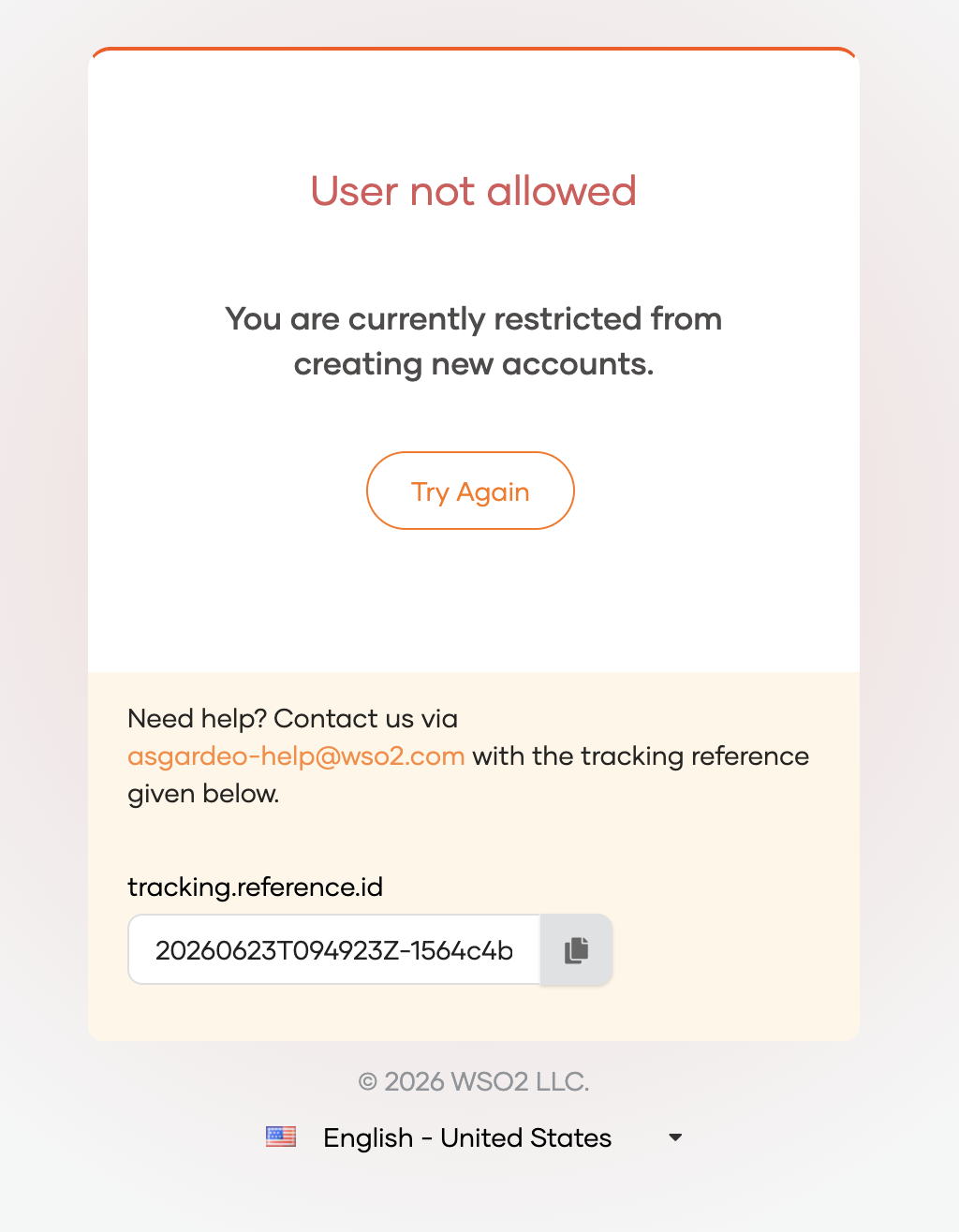
  "actionStatus": "FAILED",
  "failureReason": "User not allowed",
  "failureDescription": "You are currently restricted from creating new accounts."
}
The end user sees the failureReason and failureDescription rendered as a flow error:
Error response
Use ERROR when your service itself hits a processing or server error (a downstream call failed, an unexpected exception was caught, and so on). Return HTTP 400, 401, or 500. WSO2 Identity Server treats this as a failure to execute the action and aborts the flow.
| Field | Type | Description |
|---|---|---|
actionStatus |
string | ERROR |
errorMessage |
string | A short error message. Published to diagnostic logs. |
errorDescription |
string | A longer description of the error. Published to diagnostic logs. |
{
  "actionStatus": "ERROR",
  "errorMessage": "External service failure",
  "errorDescription": "The external service met with an unexpected error."
}
Avoid exposing personal data in error messages
Don't include personally identifiable information (PII) in failureReason, failureDescription, errorMessage, or errorDescription. If you must include such data, mask it.
How operations are validated
WSO2 Identity Server validates every operation in a SUCCESS response before applying it. Validation problems fall into two groups.
Problems that abort the flow. Any of the following causes the whole response to be rejected and the flow to fail:
- A value returned on an encrypted path isn't a string, isn't a valid JWE, or can't be decrypted.
- An encrypted multi-valued claim isn't returned as a single-element array holding one JWE string.
Problems that skip the operation. The following cause WSO2 Identity Server to skip the offending operation and apply the rest, so a single invalid operation doesn't fail the user's flow:
- The path is empty, unknown, or read-only (everything under
/flow/). - The path is one the extension may not write, either because WSO2 Identity Server owns the attribute or because the current flow withholds it. See attribute access levels.
- The claim URI isn't in the
http://wso2.org/claims/dialect, or doesn't resolve to an attribute registered in your organization. - The value is
nullor has the wrong type, for example, a plain string for a multi-valued claim, or an array for a single-valued claim.
Note
Single-valued claims take a string value, and multi-valued claims take an array of strings.
Example
The following example shows a self-registration flow where your service may replace two claims.
WSO2 Identity Server sends the following request:
{
   "actionType":"FLOW_EXTENSION",
   "event":{
      "flow":{
         "flowType":"REGISTRATION",
         "flowId":"d6e02342-7c5b-40de-a3f9-403ae5d163a9",
         "user":{
            "claims":[
               {
                  "uri":"http://wso2.org/claims/givenname",
                  "value":"John"
               },
               {
                  "uri":"http://wso2.org/claims/multiValuedClaim",
                  "value":[
                     "value1",
                     "value2"
                  ]
               },
               {
                  "uri":"http://wso2.org/claims/customClaim",
                  "value":"customValue1"
               }
            ]
         }
      }
   },
   "allowedOperations":[
      {
         "op":"replace",
         "paths":[
            "/user/claims[uri=http://wso2.org/claims/multiValuedClaim]",
            "/user/claims[uri=http://wso2.org/claims/customClaim]"
         ]
      }
   ],
   "requestId":"93c2fb70-6f8c-444b-8ff8-36ff580dabb7"
}
A response that applies a claim and continues the flow:
{
  "actionStatus": "SUCCESS",
  "operations": [
    {
      "op": "replace",
      "path": "/user/claims[uri=http://wso2.org/claims/customClaim]",
      "value": "123"
    }
  ]
}
A response that fails the flow:
{
  "actionStatus": "FAILED",
  "failureReason": "User not allowed",
  "failureDescription": "You are currently restricted from creating new accounts."
}
A response that reports a service-side error:
{
  "actionStatus": "ERROR",
  "errorMessage": "External service failure",
  "errorDescription": "The external service met with an unexpected error."
}
For the full API specification, see the flow extension API contract.
Next steps
Once your service is ready, configure the flow extension to register it as a connection and invoke it from a flow.