Installing as a Windows Service
Any Java-based application, including WSO2 Carbon and Carbon-based products, can be run as a Windows service by using a bridging tool such as Yet Another Java Service Wrapper (YAJSW).
Info
As YAJSW is distributed under the LGPL license and WSO2 is distributed under the Apache2 license, these two cannot be packed together in a distribution. However, any end-user or customer can freely combine components under these two licenses as long as the combined work is not distributed. The following instructions will guide you via the process of using YAJSW to install WSO2 Identity Server as a Windows Service.
Follow the instructions in the sections below to set it up.
Prerequisites
- Install JDK and set up the
JAVA_HOMEenvironment variable. For more information, see Installation Prerequisites. - Download and install a service wrapper library for running
WSO2 Identity Server as a Windows service. WSO2 recommends Yet Another
Java Service Wrapper (
YAJSW ) version 12.14, and
several WSO2 products provide a default
wrapper.conffile in their<PRODUCT_HOME>/bin/yajsw/directory. The following instructions describe how to set up this file.
Setting up the YAJSW wrapper configuration file
wrapper.conf file is used for wrapping Java Applications by YAJSW.
The wrapper.conf file found in the
<IS_HOME>/bin/yajsw/ directory holds the minimal
configuration for running a WSO2 product as a Windows Service.
-
Copy the
wrapper.conffile found in the<IS_HOME>/bin/yajsw/directory and paste it in the<YAJSW_HOME>/conf/directory.
A samplewrapper.conffile that is packed with the WSO2 product is given below.Info
If you wish to set additional properties from an external registry at runtime, store sensitive information like usernames and passwords for connecting to the registry in a properties file, and secure it with the cipher tool.
```bash tab="Minimal wrapper.conf configuration"
********************************************************************
working directory
********************************************************************
wrapper.working.dir=${carbon_home}/
Java Main class.
YAJSW: default is "org.rzo.yajsw.app.WrapperJVMMain"
DO NOT SET THIS PROPERTY UNLESS YOU HAVE YOUR OWN IMPLEMENTATION
wrapper.java.mainclass=
********************************************************************
tmp folder
yajsw creates temporary files named in_.. out_.. err_.. jna..
per default these are placed in jna.tmpdir.
jna.tmpdir is set in setenv batch file to
/tmp¶ ********************************************************************
wrapper.tmp.path = ${jna_tmpdir}
********************************************************************
Application main class or native executable
One of the following properties MUST be defined
********************************************************************
Java Application main class
wrapper.java.app.mainclass=org.wso2.carbon.bootstrap.Bootstrap
Log Level for console output. (See docs for log levels)
wrapper.console.loglevel=INFO
Log file to use for wrapper output logging.
wrapper.logfile=${wrapper_home}\/log\/wrapper.log
Format of output for the log file. (See docs for formats)
wrapper.logfile.format=LPTM
Log Level for log file output. (See docs for log levels)
wrapper.logfile.loglevel=INFO
Maximum size that the log file will be allowed to grow to before
the log is rolled. Size is specified in bytes. The default value
of 0, disables log rolling by size. May abbreviate with the 'k' (kB) or
'm' (mB) suffix. For example: 10m = 10 megabytes.
If wrapper.logfile does not contain the string ROLLNUM it will be automatically added as suffix of the file name
wrapper.logfile.maxsize=10m
Maximum number of rolled log files which will be allowed before old
files are deleted. The default value of 0 implies no limit.
wrapper.logfile.maxfiles=10
Title to use when running as a console
wrapper.console.title=WSO2 Carbon
********************************************************************
Wrapper Windows Service and Posix Daemon Properties
********************************************************************
Name of the service
wrapper.ntservice.name=WSO2CARBON
Display name of the service
wrapper.ntservice.displayname=WSO2 Carbon
Description of the service
wrapper.ntservice.description=Carbon Kernel
********************************************************************
Wrapper System Tray Properties
********************************************************************
enable system tray
wrapper.tray = true
TCP/IP port. If none is defined multicast discovery is used to find the port
Set the port in case multicast is not possible.
wrapper.tray.port = 15002
********************************************************************
Exit Code Properties
Restart on non zero exit code
********************************************************************
wrapper.on_exit.0=SHUTDOWN wrapper.on_exit.default=RESTART
********************************************************************
Trigger actions on console output
********************************************************************
On Exception show message in system tray
wrapper.filter.trigger.0=Exception wrapper.filter.script.0=${wrapper_home}/scripts/trayMessage.gv wrapper.filter.script.0.args=Exception
********************************************************************
genConfig: further Properties generated by genConfig
********************************************************************
placeHolderSoGenPropsComeHere= wrapper.java.command = java wrapper.java.classpath.1 = {carbon_home}/bin/*.jar wrapper.java.classpath.2 = {carbon_home}/lib/commons-lang-*.jar wrapper.java.classpath.3 = {carbon_home}/lib/*.jar wrapper.app.parameter.1 = org.wso2.carbon.bootstrap.Bootstrap wrapper.app.parameter.2 = RUN wrapper.java.additional.1 = -Xbootclasspath/a:{carbon_home}/lib/xboot/{carbon_home}/lib/xboot/.jar wrapper.java.additional.2 = -Xms256m wrapper.java.additional.3 = -Xmx1024m wrapper.java.additional.4 = -XX:MaxPermSize=256m wrapper.java.additional.5 = -XX:+HeapDumpOnOutOfMemoryError wrapper.java.additional.6 = -XX:HeapDumpPath={carbon_home}/lib/xboot/.jar wrapper.java.additional.2 = -Xms256m wrapper.java.additional.3 = -Xmx1024m wrapper.java.additional.4 = -XX:MaxPermSize=256m wrapper.java.additional.5 = -XX:+HeapDumpOnOutOfMemoryError wrapper.java.additional.6 = -XX:HeapDumpPath={carbon_home}/repository/logs/heap-dump.hprof wrapper.java.additional.7 = -Dcom.sun.management.jmxremote wrapper.java.additional.8 = -Dcarbon.registry.root=\/ wrapper.java.additional.9 = -Dcarbon.home={carbon_home}/repository/logs/heap-dump.hprof wrapper.java.additional.7 = -Dcom.sun.management.jmxremote wrapper.java.additional.8 = -Dcarbon.registry.root=\/ wrapper.java.additional.9 = -Dcarbon.home={carbon_home}/lib/xboot/{carbon_home}/lib/xboot/.jar wrapper.java.additional.2 = -Xms256m wrapper.java.additional.3 = -Xmx1024m wrapper.java.additional.4 = -XX:MaxPermSize=256m wrapper.java.additional.5 = -XX:+HeapDumpOnOutOfMemoryError wrapper.java.additional.6 = -XX:HeapDumpPath={carbon_home}/lib/xboot/.jar wrapper.java.additional.2 = -Xms256m wrapper.java.additional.3 = -Xmx1024m wrapper.java.additional.4 = -XX:MaxPermSize=256m wrapper.java.additional.5 = -XX:+HeapDumpOnOutOfMemoryError wrapper.java.additional.6 = -XX:HeapDumpPath={carbon_home}/repository/logs/heap-dump.hprof wrapper.java.additional.7 = -Dcom.sun.management.jmxremote wrapper.java.additional.8 = -Dcarbon.registry.root=\/ wrapper.java.additional.9 = -Dcarbon.home={carbon_home}/repository/logs/heap-dump.hprof wrapper.java.additional.7 = -Dcom.sun.management.jmxremote wrapper.java.additional.8 = -Dcarbon.registry.root=\/ wrapper.java.additional.9 = -Dcarbon.home={carbon_home} wrapper.java.additional.10 = -Dwso2.server.standalone=true wrapper.java.additional.11 = -Djava.command={java_home}/bin/java wrapper.java.additional.12 = -Djava.io.tmpdir={carbon_home}/tmp wrapper.java.additional.13 = -Dcatalina.base={carbon_home}/lib/tomcat wrapper.java.additional.14 = -Djava.util.logging.config.file={carbon_home}/repository/conf/etc/logging-bridge.properties wrapper.java.additional.15 = -Dcarbon.config.dir.path={carbon_home}/repository/conf wrapper.java.additional.16 = -Dcarbon.logs.path={carbon_home}/repository/logs wrapper.java.additional.17 = -Dcomponents.repo={carbon_home}/repository/components/plugins wrapper.java.additional.18 = -Dconf.location={carbon_home}/repository/conf wrapper.java.additional.19 = -Dcom.atomikos.icatch.file={carbon_home}/lib/transactions.properties wrapper.java.additional.20 = -Dcom.atomikos.icatch.hide_init_file_path=true wrapper.java.additional.21 = -Dorg.apache.jasper.runtime.BodyContentImpl.LIMIT_BUFFER=true wrapper.java.additional.22 = -Dcom.sun.jndi.ldap.connect.pool.authentication=simple wrapper.java.additional.23 = -Dcom.sun.jndi.ldap.connect.pool.timeout=3000 wrapper.java.additional.24 = -Dorg.terracotta.quartz.skipUpdateCheck=true wrapper.java.additional.25 = -Dorg.apache.jasper.compiler.Parser.STRICT_QUOTE_ESCAPING=false wrapper.java.additional.26 = -Dfile.encoding=UTF8 wrapper.java.additional.27 = -DworkerNode=false wrapper.java.additional.28 = -Dhttpclient.hostnameVerifier=DefaultAndLocalhost wrapper.java.additional.29 = -Dcarbon.new.config.dir.path={carbon_home}/repository/resources/conf ```
Setting up carbon_home
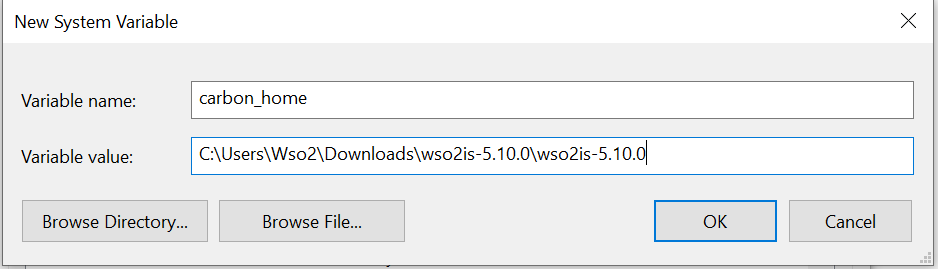
Extract the Carbon-based product that you want to run as a Windows
service, and then set the Windows environment variable carbon_home
to the extracted product directory location. For example, if you want to
run WSO2 IS 5.11.0 as a Windows service, you would set carbon_home to the
extracted wso2is-5.11.0 directory.
Running the product in console mode
You will now verify that YAJSW is configured correctly for running the Carbon-based product as a Windows service.
-
Open a Windows command prompt and go to the
<YAJSW_HOME>/bat/directory. For example:cd C:\Documents and Settings\yajsw_home\bat -
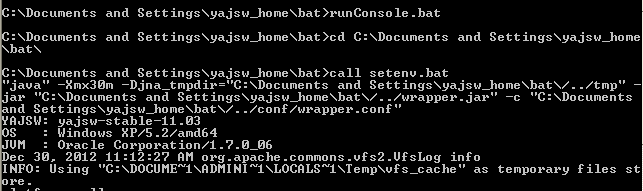
Start the wrapper in console mode using the following command:
runConsole.batIf the configurations are set properly for YAJSW, you will see console output similar to the following. Now you can access the WSO2 management console from your web browser via https://localhost:9443/carbon.
Working with the WSO2CARBON service
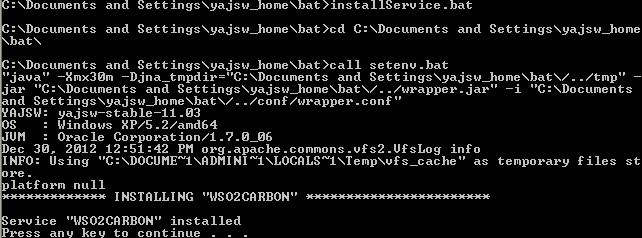
To install the Carbon-based product as a Windows service, execute the
following command in the <YAJSW_HOME>/bat/ directory:
installService.batThe console will display a message confirming that the WSO2CARBON service has been installed.
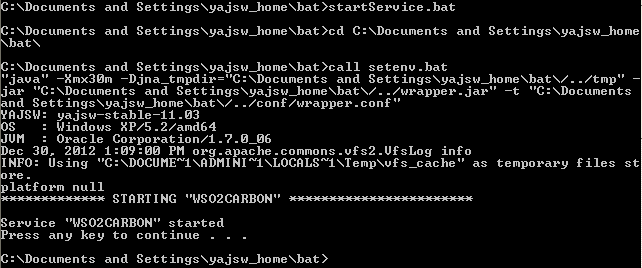
To start the service, execute the following command in the same console window:
startService.batThe console will display a message confirming that the WSO2CARBON service has been started.
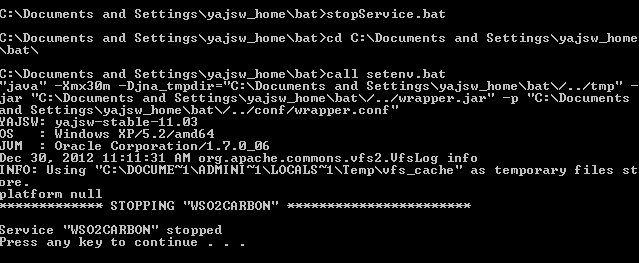
To stop the service, execute the following command in the same console window:
stopService.batThe console will display a message confirming that the WSO2CARBON service has been stopped.
To uninstall the service, execute the following command in the same console window:
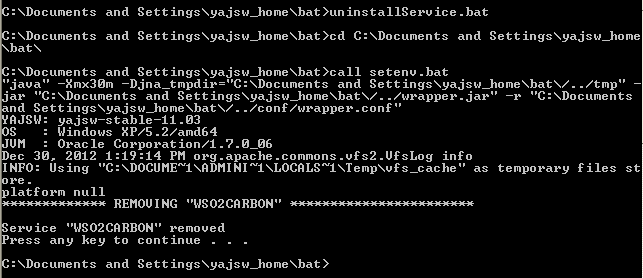
uninstallService.batThe console will display a message confirming that the WSO2CARBON service has been removed.