Extended User Self Registration API and Account Confirmation API
WSO2 Identity Server (WSO2 IS) supports self-registration to allow users set up their account and receive confirmation when the account is created.
WSO2 Identity Server allows the user to confirm their account via a user-preferred channel of communication. Based on the user-preference, the user self-registration process supports email or mobile as the preferred account confirmation channel for the user.
Note
Currently, WSO2 IS supports SMS and EMAIL as Internal Notification channels. Each channel has the following attributes.
Channel Type: SMS
Claim: http://wso2.org/claims/mobile
Channel Verified Claim: http://wso2.org/claims/identity/phoneVerified

Channel Type: EMAIL
Claim: http://wso2.org/claims/emailaddress
Channel Verified Claim: http://wso2.org/claims/identity/emailVerified
The account confirmation channel is selected based on the following scenarios.
-
SMS: If the user has provided only the mobile number, the confirmation channel will be SMS.
-
Email: If the user has provided only the email address, the confirmation channel will be email.
-
Either SMS or email: If the user has provided both mobile number and email address, the confirmation channel will be either sms or email.
NOTE: In this case, the account confirmation channel will be the preferred channel selected by the specific user. If the user has not specified any preferred channel, the server configured channel is selected as the account confirmation channel.
Following sections will guide you via the usage of APIs to configure user self-registration to support multiple confirmation channels.
Note
This feature is only available via the Self Registration and Account confirmation REST APis. Currently, WSO2 does not support this feature via the End User Dashboard.
To try out self-registration, click User Self Registration and Account confirmation via Mobile and Email Channels.
Self registration API
This section describes how the self registration API works, the flow, and sample API requests and responses.
How it works
-
In a self-registration request, either the mobile number or email address (or both claims) is required for the server to initiate an account verification request (i.e., at least one claim should be in the request).
Mobile claim: http://wso2.org/claims/mobile Email claim: http://wso2.org/claims/emailaddress -
WSO2 Self Register API support two types of registration requests.
- Self-registration with pre-verified claims
- Self-registration with post user account verifications
| Self Register Request Type | Description | Self-registration with pre-verified claims |
NOTE: This feature is only supported when the prior verified channel is either EMAIL or SMS. Note To enable this feature add the following configuration to the
After enabling this feature, if the user has verified channels, the user will not be asked to verify the account and account will be unclocked on creation. Warning WSO2 recommends verifying users after self registration (Post channel verification).
Therefore, it is recommended to set the property to
TRUE.
Phone verified
claim needs to be in the self-registration request with the value set to TRUE.
Following are the claims associated with each channel
|
|---|---|
| Self-registration with post user account verifications | The user is not verified prior to the self-registration. The user account needs to be verified after the user self-registration process via internal channels or external channels. |
-
A claim with a user’s preference can be included in the request. Enable claim
Preferred Channelfrom the management console.Preferred channel: http://wso2.org/claims/identity/preferredChannel -
Once the server receives a self-registration request, the server will send notifications based on the following scenarios.
-
Initiate a self-registration request and verify the user account via WSO2 IS
The server sends notifications to the user by resolving the communication channel internally. The notification channel resolution is as follows.
-
Initiate a self-registration request, verify user account externally and confirm the flow to WSO2 IS
The server provides a confirmation code to be used to confirm the user account.
-
Self-register after pre-confirmation of the user account, with verified claims
The user is already verified. In this case, the user account should not be locked or prompted for verification. Therefore, no notifications are sent.
-
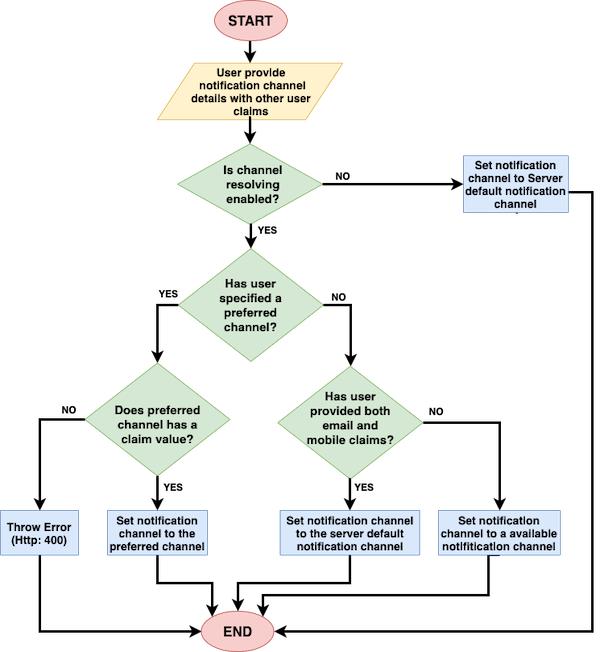
Notification channel selection criteria
-
The user inputs the notification channel details with other user claims.
-
If channel resolving is
not enabled, the notification channel is set to use the server default notification channel.Note
-
Navigate to the
deployment.tomland setenable_resolve_notification_channeltotrueto enable channel resolving. -
To configure default notification channel, navigate to the
deployment.tomland set a value (EMAILorSMS). -
For more information , see Configuring self-registration.
-
-
If channel resolving property is
enabled, the server will check for a user preferred notification channel.-
If the user has only provided an email address or a mobile number as the notification channel and the user has not specified a preferred channel, the notification will be sent via the channel that is given in the request as a claim value.
Example: If only the mobile number has been provided, mobile number is considered as the preferred channel.
-
If the user has specified a preferred channel and the preferred channel matches with the given claim values, the confirmation info will be sent via the user specified preferred channel.
Example: If the preferred channel is specified as SMS and the provided claim value is a mobile number, an OTP will be sent to the user.
-
If the user has specified a preferred channel and the preferred channel does not match with the given claim values, a 400 ERROR is returned.
Example: The preferred channel is specified as SMS but there is no value for the mobile number.
Note
Each notification channel is bound with the claim channel.
Notification Channel Bounded Value Claim EMAIL http://wso2.org/claims/emailaddress SMS http://wso2.org/claims/mobile Warning
Changing the bounded value claim will cause errors.
-
If the user has provided both email and a mobile as communication channels and has also specified a preferred channel, the notification will be sent via the preferred channel.
-
If the user has provided both email and mobile as communication channels but has not specified a preferred channel, notification will be sent via the server default channel.
-
-
Once the communication channel is resolved, an event is triggered. Once the event is triggered, the notification handlers will send notifications to the user.
The event names will be in the following format.
Channel Event Name SMS TRIGGER_SMS_NOTIFICATION Email TRIGGER_NOTIFICATION Note
If you have any custom notification handlers, you need to subscribe the notification handler to above events.
API Requests and Responses
There are three scenarios associated with user self registration.
-
Self registration with internally managed notifications and account lock on creation.
User Self Registers without Verified Claims
Sub scenario: The user self registers without verified claims.
A notification will be sent to the user and the user will be asked to verify via the preferred channel. After confirmation, verified claims will be set as attributes of the user (HTTP: 201).
Sample Request
curl -X POST -H "Authorization: Basic YWRtaW46YWRtaW4=" -H "Content-Type: application/json" -d '{"user": {"username": "kim","realm": "PRIMARY", "password": "Password12!","claims": [{"uri": "http://wso2.org/claims/givenname","value": "kim" },{"uri": "http://wso2.org/claims/emailaddress","value": "[email protected]"},{"uri": "http://wso2.org/claims/lastname","value": "Anderson"},{"uri": "http://wso2.org/claims/mobile","value": "+947721584558"} ] },"properties": []}' "https://localhost:9443/api/identity/user/v1.0/me"Sample Response
{
"code": "USR-02001",
"message": "Successful user self registration. Pending account verification",
"notificationChannel": "SMS",
"confirmationCode": null
}
User Self Registers with Verified Claims
Sub scenario: The user self registers with verified claims.
If the verified claims match the preferred notification channel, the user will be created and the account will be unlocked (HTTP: 201).
Sample Request
curl -X POST -H "Authorization: Basic YWRtaW46YWRtaW4=" -H "Content-Type: application/json" -d '{"user": {"username": "kim","realm": "PRIMARY", "password": "Password12!","claims": [{"uri": "http://wso2.org/claims/givenname","value": "kim" },{"uri": "http://wso2.org/claims/emailaddress","value": "[email protected]"},{"uri": "http://wso2.org/claims/identity/emailVerified","value": "true"},{"uri": "http://wso2.org/claims/lastname","value": "Anderson"},{"uri": "http://wso2.org/claims/mobile","value": "+947721584558"} ] },"properties": []}' "https://localhost:9443/api/identity/user/v1.0/me"Sample Response
{
"code": "USR-02004",
"message": "Successful user self registration with verified channel. Account verification not required.",
"notificationChannel": null,
"confirmationCode": null
}
Note
-
If the verified claims do not match the preferred notification channel, the user will be created and the user will be asked to verify the account via the preferred channel.
-
Example: User's
SMSchannel is already verified but user wantsEMAILto be the preferred channel of communication.
Sample Response
{ "code": "USR-02001", "message": "Successful user self registration. Pending account verification", "notificationChannel": "EMAIL", "confirmationCode": null } -
-
Self registration with externally managed notifications and account lock on creation.
User Self Registers without Verified Claims
Sub scenario: The user self registers without verified claims.
A notification will be sent to the user and the user will be asked to verify via the preferred channel. After confirmation, verified claims will be set as attributes of the user (HTTP: 201).
Sample Request
curl -X POST -H "Authorization: Basic YWRtaW46YWRtaW4=" -H "Content-Type: application/json" -d '{"user": {"username": "kim","realm": "PRIMARY", "password": "Password12!","claims": [{"uri": "http://wso2.org/claims/givenname","value": "kim" },{"uri": "http://wso2.org/claims/emailaddress","value": "[email protected]"},{"uri": "http://wso2.org/claims/lastname","value": "Anderson"},{"uri": "http://wso2.org/claims/mobile","value": "+947721584558"} ] },"properties": []}' "https://localhost:9443/api/identity/user/v1.0/me"Sample Response
{
"code": "USR-02002",
"message":"Successful user self registration. External verification required",
"notificationChannel": "EXTERNAL",
"confirmationCode": "fb03f437-a46f-4da1-8e99-fafab4aad4a4"
}
User Self Registers with Verified Claims
Sub scenario: The user self registers with verified claims.
If the verified claims match the preferred notification channel, the user will be created and the account will be unlocked (HTTP: 201).
Sample Request
curl -X POST -H "Authorization: Basic YWRtaW46YWRtaW4=" -H "Content-Type: application/json" -d '{"user": {"username": "kim","realm": "PRIMARY", "password": "Password12!","claims": [{"uri": "http://wso2.org/claims/givenname","value": "kim" },{"uri": "http://wso2.org/claims/emailaddress","value": "[email protected]"},{"uri": "http://wso2.org/claims/identity/emailVerified","value": "true"},{"uri": "http://wso2.org/claims/lastname","value": "Anderson"},{"uri": "http://wso2.org/claims/mobile","value": "+947721584558"} ] },"properties": []}' "https://localhost:9443/api/identity/user/v1.0/me"Sample Response
{
"code":"USR-02004",
"message":"Successful user self registration with verified channel. Account verification not required.",
"notificationChannel":null,
"confirmationCode":null
}
Note
-
If the verified claims do not match the preferred notification channel, the user will be created and the API will return a confirmation code.
-
Example: User's
SMSchannel is already verified but user wantsEMAILto be the preferred channel of communication.
Sample Response
{ "code": "USR-02002", "message":"Successful user self registration. External verification required", "notificationChannel": "EXTERNAL", "confirmationCode": "fb03f437-a46f-4da1-8e99-fafab4aad4a4" } -
-
Self registration with account not locked creation.
This scenario is almost similar to the above two scenarios. The difference is, the
account lock on creationis disabled in Resident IDP Settings.Note
For more information on configuring self registration, see Configuring self-registration.
Sample Response
{
"code": "USR-02003",
"message": "Successful user self registration. Account not locked on user creation",
"notificationChannel": null,
"confirmationCode": null
}
Error responses
-
Providing an existing username (HTTP: 409)
- Preferred channel not supported by the server (HTTP: 400){ "code": "20030", "message": "Conflict", "description": "User TestUser1 already exists in the system. Please use a different username." }{ "code": "USR-10001", "message": "Bad Request", "description": "User specified communication channel is not supported by the server" } -
Not providing value to the preferred channel claim (HTTP: 400)
Example: specifying the preferred channel as EMAIL but not providing the claim value for the http://wso2 .org/claims/emailaddress claim/
{
"code": "USR-10002",
"message": "Bad Request",
"description": "User specified communication channel does not have any value"
}
Account confirmation API
For account confirmations, WSO2 Identity Server supports multiple verification channels and allows defining the verified channel (i.e., whether the account confirmation was communicated via email or sms) in the API request.
Using theverifiedChannel parameter
-
Using the
verifiedChannelparameter, the user can be verified with any server supported channel (SMSorEMAIL). -
In the following sample, the SMS channel for the user is set as the verified notification channel.
Sample JSON request body
{
"code": "1a39ec29-9417-4f69-93b6-b7f2bbf75413",
"verifiedChannel":{"type":"SMS", "claim":"http://wso2.org/claims/mobile"},
"properties": []
}
Sample Request
``` tab="Notification Channel is either EMAIL or SMS" curl -k -v -X POST -H "Authorization: Basic YWRtaW46YWRtaW4=" -H "Content-Type: application/json" -d '{ "code": "84325529-8aa7-4851-8751-5980a7f2d9f7","properties": []}' "https://localhost:9443/api/identity/user/v1.0/validate-code"
``` tab="Notification Channel is EXTERNAL"
curl -k -v -X POST -H "Authorization: Basic YWRtaW46YWRtaW4=" -H  "Content-Type: application/json" -d '{ "code": "84325529-8aa7-4851-8751-5980a7f2d9f7","verifiedChannel":{"type":"SMS", "claim":"http://wso2.org/claims/mobile"},"properties": []}' "https://localhost:9443/api/identity/user/v1.0/validate-code"
Warning
When the notification are externally managed, if the verified channel is not specified in the account confirmation request, EMAIL will be considered as the verified notification channel for the user.
Try out self-registration
To try out self-registration, click User Self Registration and Account confirmation via Mobile and Email Channels.
Top