UI branding inheritance
In WSO2 Identity Server, child organizations inherit branding from the organizational hierarchy. Child organizations can make their own adjustments to these inherited settings.
Organization administrators can access these settings in the WSO2 Identity Server Console under Branding > Styles & Text.
How it works
Inheritance for UI branding works as follows based on the branding type.
Organization-wide branding
Organization-wide branding settings apply to all applications within the organization. For all applications,
-
Child organizations inherit branding settings from the nearest ancestor with custom branding settings. If no ancestor has customized settings, the default value applies.
-
Organizations can customize their own branding settings, overriding the inherited settings. These overridden settings then pass down to the organization’s descendants.
Customized branding does not track later ancestor changes
Once an organization customizes its branding, it stops inheriting from its ancestors. Any branding changes made later at an ancestor level are not propagated to it; the organization keeps using its own customized settings independently. This continues until the organization reverts its branding, at which point it resumes inheriting from the nearest ancestor with custom settings.
-
Organizations can also revert their branding settings, restoring the inherited values.
Application-specific branding
Application-specific branding settings apply to a single application. For a given application,
-
Child organizations inherit branding from the nearest ancestor with custom settings. The rules are:
-
Application-specific branding overrides organization-wide branding at the same hierarchy level.
-
If the ancestor has application-specific branding, the child inherits that.
-
Otherwise, it inherits the ancestor’s organization-wide branding.
-
If no ancestor has customized settings, the default branding applies.
-
-
If the organization has its own organization-wide branding, that applies to the application.
-
Organizations can customize their own application-specific branding settings, overriding either their organization-wide settings or the inherited settings. These overridden settings then pass down to the organization’s descendants.
Customized branding does not track later ancestor changes
Once an organization customizes its application-specific branding, it stops inheriting from its ancestors for that application. Any branding changes made later at an ancestor level are not propagated to it; the application keeps using its own customized settings independently. This continues until the application-specific branding is reverted, at which point it resumes using the organization’s own organization-wide branding if available, or otherwise inherits from the nearest ancestor.
-
Organizations can also revert application-specific branding settings. When reverted, the application uses the organization’s custom branding settings. If the organization has no custom branding, it inherits the branding from the nearest parent organization in the hierarchy that has custom settings.
Reverting affects the entire branding configuration
Reverting removes all branding customizations saved at that level and restores inherited values. You cannot revert an individual setting, such as only the logo.
Clearing a field and saving does not restore inheritance for that field. The customization at that level remains active, and the cleared field is saved as empty.
To restore inherited branding, select Revert to default. For more information, see Configure UI branding.
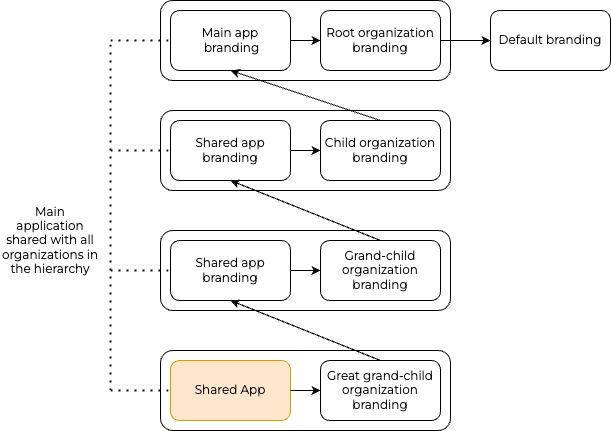
The following diagram explains how inheritance works for UI branding when your organization hierarchy has a combination of organization-wide branding and application-specific branding.
Configure UI branding
To learn how to configure UI branding for an organization, see the Configure UI branding guide.